Frontend & UI / React-Restaurant-App
L'Étoile Restaurant - React Frontend
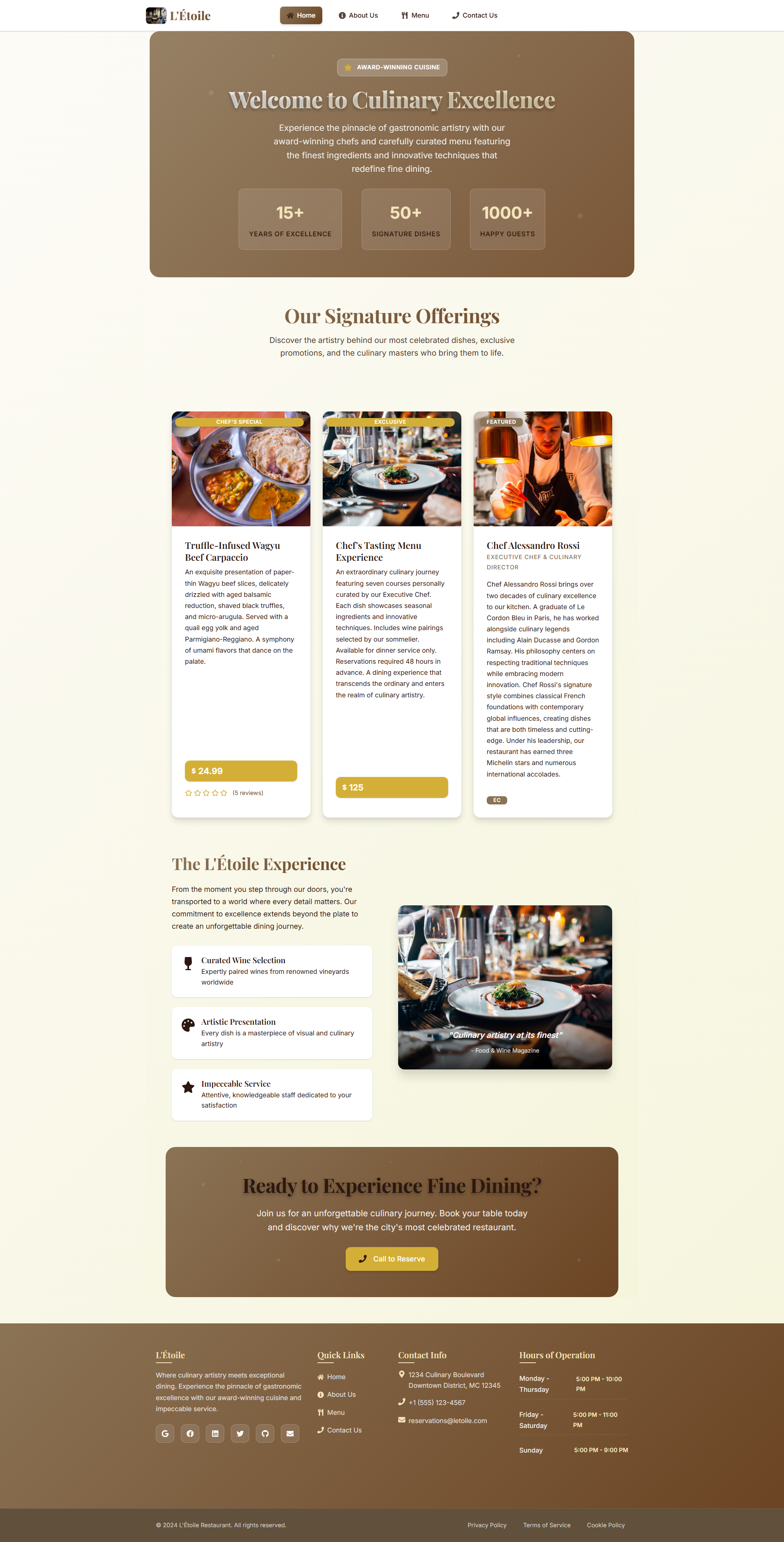
A sophisticated, modern React application for a fine dining restaurant with elegant UI/UX design, Redux state management, and direct user interactions.
Open the full technical write-up
A sophisticated, modern React application for a fine dining restaurant with elegant UI/UX design, Redux state management, and direct user interactions.




** GitHub Repository:** https://github.com/Tuhin-SnapD/React-Restaurant-App
What the project includes
Sophisticated UI/UX Design
- Modern, elegant interface with sophisticated styling
- Responsive design that works on all devices
- Smooth animations and transitions
- Professional color scheme and typography
Restaurant Management
- Interactive Menu: Browse dishes with detailed descriptions, pricing, and ratings
- Dish Details: Comprehensive dish information with user reviews and ratings
- Featured Items: Highlight special dishes and promotions
- Category Filtering: Filter dishes by appetizers, mains, and desserts
User Engagement
- Review System: Users can rate and review dishes
- Contact Form: Sophisticated feedback submission system
- About Section: Information about restaurant leadership and history
- Reservation System: Contact information for bookings
Technical Excellence
- Redux State Management: Centralized state management with Redux
- React Router: Client-side routing for direct navigation
- Form Validation: Comprehensive form handling with react-hook-form
- Error Handling: reliable error handling and loading states
- Performance Optimized: Efficient rendering and data management
Quick Start
Prerequisites
- Node.js (v14 or higher)
- npm or yarn package manager
Installation
-
Clone the repository
git clone https://github.com/Tuhin-SnapD/React-Restaurant-App.git cd React-Restaurant-App -
Install dependencies
npm install # or yarn install -
Start the development server
npm start # or yarn start -
Open your browser Navigate to
http://localhost:3000to view the application
How files are organized
src/
├── components/          # React components
│   ├── AboutComponent.js
│   ├── ContactComponent.js
│   ├── DishdetailComponent.js
│   ├── FooterComponent.js
│   ├── HeaderComponent.js
│   ├── HomeComponent.js
│   ├── LoadingComponent.js
│   ├── MainComponent.js
│   └── MenuComponent.js
├── redux/              # Redux store and actions
│   ├── ActionCreators.js
│   ├── ActionTypes.js
│   ├── comments.js
│   ├── configureStore.js
│   ├── dishes.js
│   ├── forms.js
│   ├── leaders.js
│   └── promotions.js
├── shared/             # Shared utilities
│   └── baseUrl.js
├── App.js              # Main application component
└── index.js            # Application entry point
Available Scripts
npm start- Runs the app in development modenpm test- Launches the test runnernpm run build- Builds the app for productionnpm run eject- Ejects from Create React App (one-way operation)
Key Components
MainComponent.js
- Central routing hub with Redux integration
- Manages data fetching and state distribution
- Handles navigation and component rendering
MenuComponent.js
- Displays restaurant menu with filtering capabilities
- Interactive dish cards with ratings and categories
- Responsive grid layout with sophisticated styling
DishdetailComponent.js
- Detailed dish information display
- User review and rating system
- Comment submission functionality
ContactComponent.js
- Sophisticated contact form with validation
- Multiple feedback types (compliment, suggestion, complaint)
- Professional styling with success notifications
Configuration
Backend API Configuration
The application is configured to connect to a backend API. Update the base URL in src/shared/baseUrl.js:
export const baseUrl = 'http://localhost:8000/';
Environment Variables
Create a .env file in the root directory for environment-specific configurations:
REACT_APP_API_URL=http://localhost:8000
REACT_APP_ENVIRONMENT=development
Deployment
Build for Production
npm run build
Deploy to Various Platforms
Netlify
- Connect your GitHub repository to Netlify
- Set build command:
npm run build - Set publish directory:
build
Vercel
- Install Vercel CLI:
npm i -g vercel - Deploy:
vercel
GitHub Pages
- Add homepage to package.json:
"homepage": "https://username.github.io/repo-name" - Install gh-pages:
npm install --save-dev gh-pages - Add deploy scripts to package.json
- Deploy:
npm run deploy
Testing
Run the test suite:
npm test
Run tests with coverage:
npm test -- --coverage --watchAll=false
Dependencies
Core Dependencies
- React 17.0.2 - UI library
- Redux 4.0.5 - State management
- React Router 5.3.4 - Client-side routing
- Bootstrap 4.0.0 - CSS framework
- Reactstrap 8.9.0 - Bootstrap components for React
Development Dependencies
- React Scripts 5.0.0 - Build tools
- ESLint - Code linting
- Jest - Testing framework
Contributing
- Fork the repository
- Create a feature branch (
git checkout -b feature/amazing-feature) - Commit your changes (
git commit -m 'Add some amazing feature') - Push to the branch (
git push origin feature/amazing-feature) - Open a Pull Request
License
This project is licensed under the MIT License - see the LICENSE file for details.
Acknowledgments
- Prof. Jogesh Muppala - Associate Professor at Hong Kong University of Science and Technology
- React community for excellent documentation and tools
- Bootstrap team for the responsive framework
Support
For support and questions:
- Email: reservations@letoile.com
- Phone: +1 (555) 123-4567
- Website: L'Étoile Restaurant
Made with for the culinary arts