Data & Analytics / PharmaPOS
Pharmacy Management System v2.0
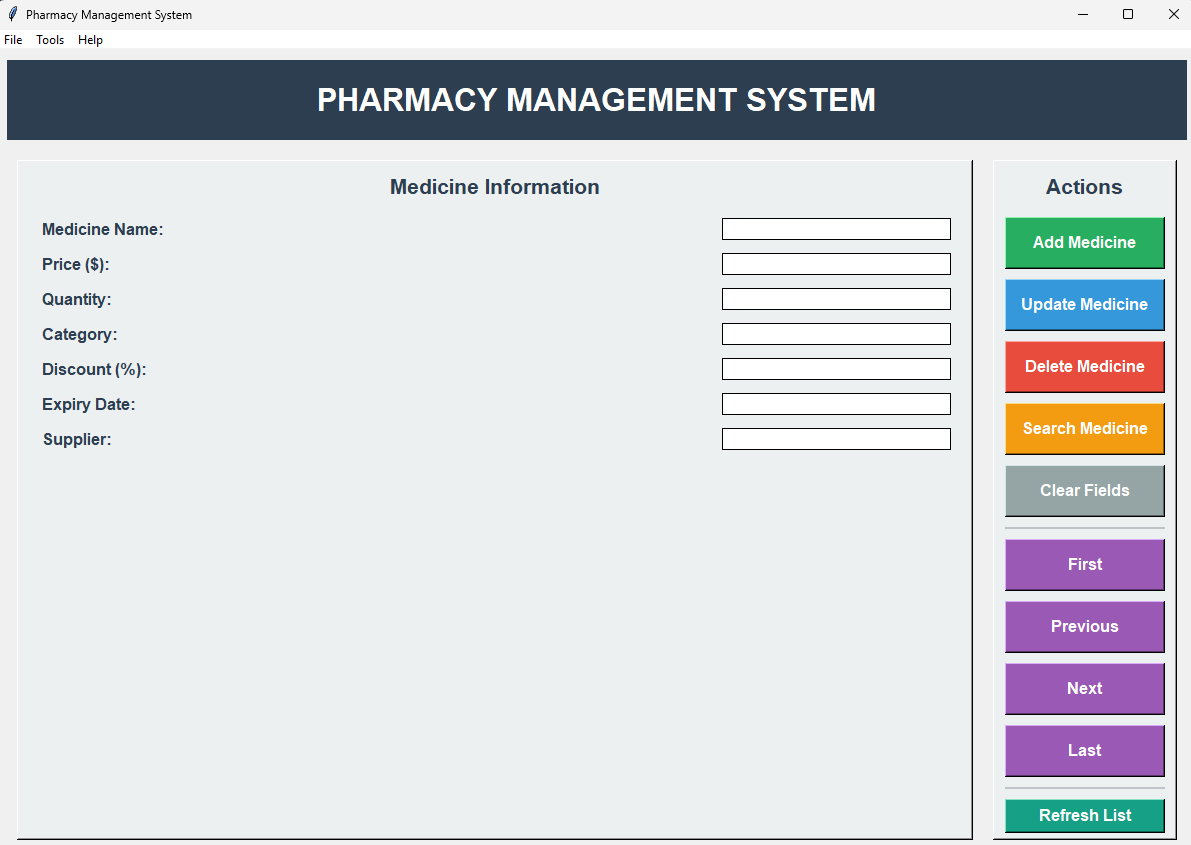
A comprehensive pharmacy management solution built with Python and Tkinter, designed for small to medium-sized pharmacies and medical stores.
Open the full technical write-up
A comprehensive pharmacy management solution built with Python and Tkinter, designed for small to medium-sized pharmacies and medical stores.
What the project includes
Core Functionality
- Medicine Inventory Management: Add, update, delete, and search medicines
- Point of Sale System: Complete POS interface for sales transactions
- Database Management: SQLite database for reliable data storage
- User-Friendly Interface: Modern, intuitive GUI with professional styling
Advanced workflows
- Low Stock Alerts: Automatic notifications for medicines running low
- Expiry Date Tracking: Monitor medicines approaching expiration
- Sales Analytics: Comprehensive reports and analytics dashboard
- Category Management: Organize medicines by categories
- Search & Filter: Advanced search capabilities
- Sales History: Track all sales transactions
- Inventory Reports: Generate detailed inventory reports
Reports & Analytics
- Low Stock Report: Identify medicines needing restocking
- Expiring Medicines: Track medicines nearing expiration
- Sales Summary: Revenue and sales statistics
- Category Distribution: Visual charts of inventory by category
- Top Selling Medicines: Best-performing products analysis
Quick Start
Prerequisites
- Python 3.7 or higher (Download here)
- pip (included with Python)
Windows Installation (One-Click)
-
Download or clone the repository
git clone https://github.com/Tuhin-SnapD/PharmaPOS.git cd PharmaPOS -
Double-click
pharmacy.bat- The script will automatically:
- Check Python installation
- Create virtual environment (optional)
- Install dependencies
- Start the application
- The script will automatically:
Manual Installation
Using Virtual Environment (Recommended)
-
Clone the repository
git clone https://github.com/Tuhin-SnapD/PharmaPOS.git cd PharmaPOS -
Create virtual environment
python mathematics -m venv venv -
Activate virtual environment
Windows:
venv\Scripts\activatemacOS/Linux:
source venv/bin/activate -
Install dependencies
pip install -r requirements.txt -
Run the application
python main.py
Without Virtual Environment
-
Install dependencies globally
pip install matplotlib pandas -
Run the application
python main.py
Usage
Main Application
- Medicine Management: Use the main interface to manage your medicine inventory
- Navigation: Use the menu bar to access different features
- Search: Use the search functionality to quickly find medicines
Point of Sale
- Access via
Tools > Point of Salemenu - Search for medicines by name or category
- Add items to cart with quantities
- Process sales transactions
- Automatic inventory updates
Reports & Analytics
- Access via
Tools > Reports & Analyticsmenu - View low stock alerts
- Check expiring medicines
- Analyze sales performance
- Generate visual charts
Database Schema
The system uses SQLite database with the following tables:
Medicines Table
id: Primary keyname: Medicine nameprice: Unit pricequantity: Stock quantitycategory: Medicine categorydiscount: Discount percentageexpiry_date: Expiration datesupplier: Supplier informationcreated_at: Record creation timestampupdated_at: Last update timestamp
Sales Table
id: Primary keymedicine_id: Foreign key to medicinesquantity_sold: Quantity soldtotal_amount: Total sale amountsale_date: Sale timestamp
How files are organized
PharmaPOS/
├── 📁 src/                    # Source code
│   ├── pharmacy_app.py       # Main application
│   ├── sales.py              # Point of sale system
│   └── reports.py            # Reports and analytics
├── 📁 scripts/               # Utility scripts
│   └── demo_data.py          # Demo data generator
├── 📁 data/                  # Data storage (auto-created)
│   └── pharmacy.db          # SQLite database (created automatically)
├── 🚀 pharmacy.bat          # One-click launcher (Windows)
├── 📄 main.py               # Main entry point
├── 📄 requirements.txt      # Python dependencies
└── 📄 README.md             # This file
Technical Details
How the system is built
- Frontend: Tkinter GUI framework
- Backend: SQLite database
- Language: Python 3.7+
- Design Pattern: Object-oriented programming
Dependencies
matplotlib>=3.5.0- For charts and graphspandas>=1.3.0- For data analysis
Key Components
pharmacy_app.py: Main application and database managementsales.py: Point of sale systemreports.py: Reports and analyticsrequirements.txt: Package dependencies
Improvements from v1.0
Code Quality
- Refactored from monolithic to modular structure
- Object-oriented design with proper classes
- Type hints for better code maintainability
- Comprehensive error handling
Database
- Migrated from text files to SQLite database
- Proper data integrity and relationships
- ACID compliance for reliable transactions
User Interface
- Modern, professional design
- Improved layout and navigation
- Better user experience
- Menu bar with organized features
What the project includes
- Point of Sale system
- Advanced reporting and analytics
- Low stock and expiry alerts
- Visual charts and graphs
- Enhanced search capabilities
Development
Setting Up Development Environment
-
Clone the repository
git clone https://github.com/Tuhin-SnapD/PharmaPOS.git cd PharmaPOS -
Create and activate virtual environment
python -m venv venv venv\Scripts\activate # Windows # or source venv/bin/activate # macOS/Linux -
Install dependencies
pip install -r requirements.txt -
Run the application
python main.py
Adding Demo Data
To populate the database with sample data:
python scripts/demo_data.py
Note: This will clear existing data and create demo medicines and sales records.
Contributing
Contributions are welcome! Please feel free to submit a Pull Request.
- Fork the repository
- Create your feature branch (
git checkout -b feature/AmazingFeature) - Commit your changes (
git commit -m 'Add some AmazingFeature') - Push to the branch (
git push origin feature/AmazingFeature) - Open a Pull Request
License
This project is licensed under the MIT License - see the LICENSE file for details.
Authors
- Repository: Tuhin-SnapD
- Original Version: Developed for e-cell KIET Endeavour'21 hackathon
- Enhanced Version: Improved with modern features and better architecture
Acknowledgments
- Original development team for the initial concept
- Python community for excellent libraries
- Tkinter documentation and examples
Support
For support, please open an issue in the GitHub repository.
Important Notes
- This system is designed for educational and small business purposes
- For production use in larger pharmacies, consider additional security measures
- Always backup your database regularly
- Keep your Python environment and dependencies updated
Made with for pharmacy management