AI/ML & Data Science / NLPDash
NLPDash
Perform Part-of-Speech tagging, Named Entity Recognition, Dependency Parsing, and Lemmatization with interactive visualizations.
Open the full technical write-up
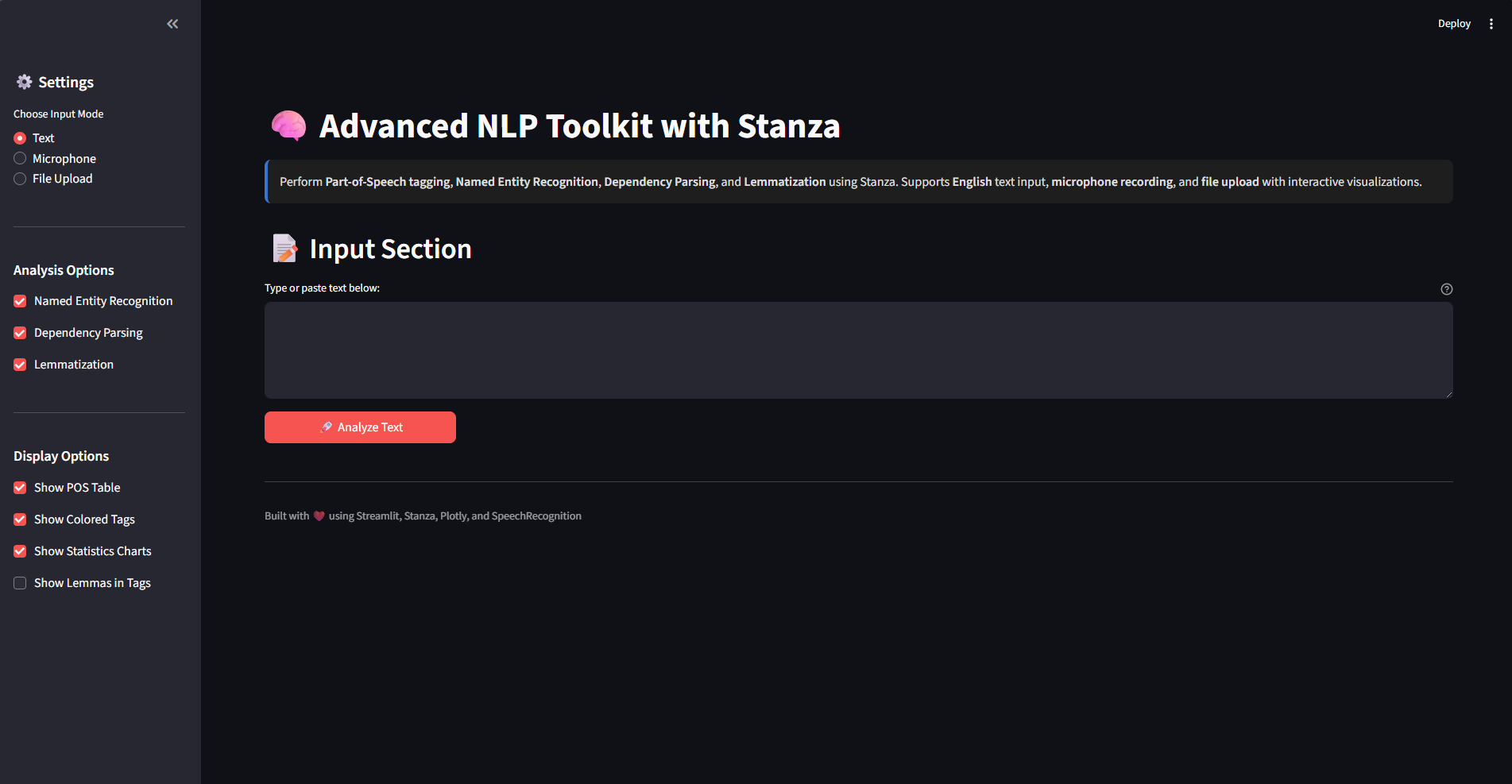
A powerful Natural Language Processing web application built with Streamlit and Stanza
Perform Part-of-Speech tagging, Named Entity Recognition, Dependency Parsing, and Lemmatization with interactive visualizations.
What the project includes
Core NLP Capabilities
- ** Part-of-Speech Tagging** - Identify nouns, verbs, adjectives, and more
- ** Named Entity Recognition** - Extract people, organizations, locations, dates
- ** Dependency Parsing** - Analyze grammatical relationships
- ** Lemmatization** - Convert words to their base forms
- ** Interactive Visualizations** - Beautiful charts and color-coded tags
Multiple Input Methods
- ** Text Input** - Type or paste text directly
- ** Voice Recording** - Transcribe speech to text (optional)
- ** File Upload** - Process .txt and .md files
User Experience
- ** Dark Theme** - Optimized for comfortable viewing
- ** Statistics Dashboard** - Word counts, sentence analysis, entity statistics
- ** Export Results** - Download POS tags and entities as CSV
- ** Configurable Options** - Enable/disable features as needed
Quick Start
Prerequisites
- Python 3.8 or higher
- pip package manager
Installation
-
Clone the repository
git clone https://github.com/Tuhin-SnapD/NLPDash.git cd NLPDash -
Install dependencies
pip install -r requirements.txt -
Run the application
streamlit run app.py -
Open your browser
- Navigate to
http://localhost:8501 - Start analyzing text!
- Navigate to
First Launch
On first run, Stanza will automatically download the English model (~500MB). This happens once and may take a few minutes. Subsequent launches will be much faster!
Usage Guide
Basic Usage
-
Enter Your Text
- Select "Text" input mode
- Type or paste your text in the text area
- Click " Analyze Text"
-
View Results
- POS Tagging Tab: See parts of speech with color-coded tags
- Named Entities Tab: View detected entities and their types
- Dependencies Tab: Explore grammatical relationships
- Statistics Tab: Review comprehensive text statistics
-
Customize Analysis
- Toggle features in the sidebar (NER, Dependency Parsing, Lemmatization)
- Adjust display options (tables, charts, colored tags)
- Show or hide lemmas in tags
Advanced workflows
Voice Recording
# Requires SpeechRecognition and PyAudio
pip install SpeechRecognition pyaudio
- Click " Record from Microphone"
- Speak clearly for best results
- Uses Google's speech recognition API
File Upload
- Select "File Upload" mode
- Upload
.txtor.mdfiles - Edit the loaded content if needed
- Analyze as normal
Export Results
- Click " Download POS Tags CSV" for tagging results
- Click " Download Entities CSV" for named entities
- Both files are UTF-8 encoded and ready for analysis
Example Use Cases
News Article Analysis
Input: "Apple Inc. was founded by Steve Jobs in Cupertino, California."
Results:
- Named Entities: Apple Inc. (ORG), Steve Jobs (PERSON), Cupertino (GPE)
- POS Tags: Noun, Verb, Preposition, etc.
- Dependencies: Subject-Verb-Object relationships
Academic Text Processing
Input: "Machine learning algorithms use neural networks to process data."
Results:
- Technical terminology identified
- POS tags for each word
- Dependency tree visualization
Business Document Analysis
Input: Financial reports, contracts, or business documents
Results:
- Named entities (companies, amounts, dates)
- Statistical analysis
- Export to CSV for further processing
How the system is built
Tech Stack
| Component | Technology | Purpose |
|---|---|---|
| Web Framework | Streamlit | Interactive web interface |
| NLP Engine | Stanza | State-of-the-art NLP processing |
| Visualization | Plotly | Interactive charts |
| Data Processing | Pandas | Data manipulation and export |
| Speech Recognition | SpeechRecognition | Voice-to-text transcription |
Pipeline
Input Text → Stanza Pipeline → Processing → Results
                ↓
         [Tokenization]
         [POS Tagging]
         [Lemmatization]
         [NER]
         [Dependency Parsing]
                ↓
         Interactive Display
         [Tables, Charts, HTML]
         [Export Options]
Sample Outputs
POS Tagging
- Color-coded tags for each part of speech
- Tables with UPOS and XPOS tags
- Distribution charts showing tag frequencies
Named Entities
- Highlighted entities in text with type labels
- Entity type distribution charts
- Exportable data with start/end positions
Dependency Parsing
- Dependency relations table
- Top relations visualization
- Grammatical structure analysis
Configuration
Requirements
streamlit>=1.28.0
stanza>=1.6.0
pandas>=2.0.0
SpeechRecognition>=3.10.0
plotly>=5.17.0
pytest>=8.0.0
Optional Dependencies
# For voice recording
pip install SpeechRecognition pyaudio
Streamlit Configuration
See .streamlit/config.toml for customization:
[theme]
primaryColor = "#1976D2"
backgroundColor = "#0E1117"
secondaryBackgroundColor = "#262730"
textColor = "#FAFAFA"

[server]
headless = true
Troubleshooting
Common Issues
Issue: Stanza model download fails
# Solution: Download manually
python -c "import stanza; stanza.download('en')"
Issue: Speech recognition not working
# Check PyAudio installation
pip install pyaudio

# On Windows, may need:
# pip install pipwin
# pipwin install pyaudio
Issue: Port already in use
# Use different port
streamlit run app.py --server.port 8502
Issue: Memory errors with large texts
- Split text into smaller chunks
- Process paragraph by paragraph
- Consider using batch processing for very large files
Performance
- Model Loading: ~2-3 seconds (first time)
- Text Processing: ~100-200 tokens/second
- Memory Usage: ~500MB-1GB (depends on text size)
- UI Response: Real-time for typical documents
Optimizations
- Cached Stanza pipeline (Streamlit
@cache_resource) - Efficient pandas DataFrame operations
- Lazy loading of visualizations
- Optimized HTML rendering
Contributing
Contributions are welcome! Here's how you can help:
- Fork the repository
- Create a feature branch
git checkout -b feature/amazing-feature - Commit your changes
git commit -m "Add amazing feature" - Push to the branch
git push origin feature/amazing-feature - Open a Pull Request
Development Setup
# Clone repository
git clone https://github.com/Tuhin-SnapD/NLPDash.git
cd NLPDash

# Create virtual environment
python -m venv venv
source venv/bin/activate  # On Windows: venv\Scripts\activate

# Install dependencies
pip install -r requirements.txt

# Install development dependencies
pip install pytest pytest-cov black flake8

# Run tests
pytest

# Format code
black app.py

# Lint code
flake8 app.py
License
This project is licensed under the MIT License - see the LICENSE file for details.
Acknowledgments
- Stanza - Stanford NLP Group for the powerful NLP library
- Streamlit - For the amazing web framework
- Plotly - For beautiful interactive visualizations
- SpeechRecognition - For voice transcription capabilities
Contact
Project Maintainer: Tuhin SnapD
GitHub: @Tuhin-SnapD
Future Enhancements
- Multi-language support (Spanish, French, German, etc.)
- Sentiment analysis
- Topic modeling
- Batch processing for multiple files
- API endpoint for programmatic access
- Docker containerization
- Cloud deployment scripts
- Integration with external NLP APIs
- Advanced visualization options
- Custom model fine-tuning
Star History
If you find this project helpful, please consider giving it a star! ⭐
Built with using Streamlit, Stanza, and Python