AI/ML & Data Science / NewsMelt-Advance-News-Finder
NewsMelt - Advanced News Analysis & Data Visualization Platform
A sophisticated news processing pipeline that combines AI-powered content extraction, advanced NLP techniques, and interactive data visualizations to provide comprehensive news analysis across multiple categories.
Open the full technical write-up
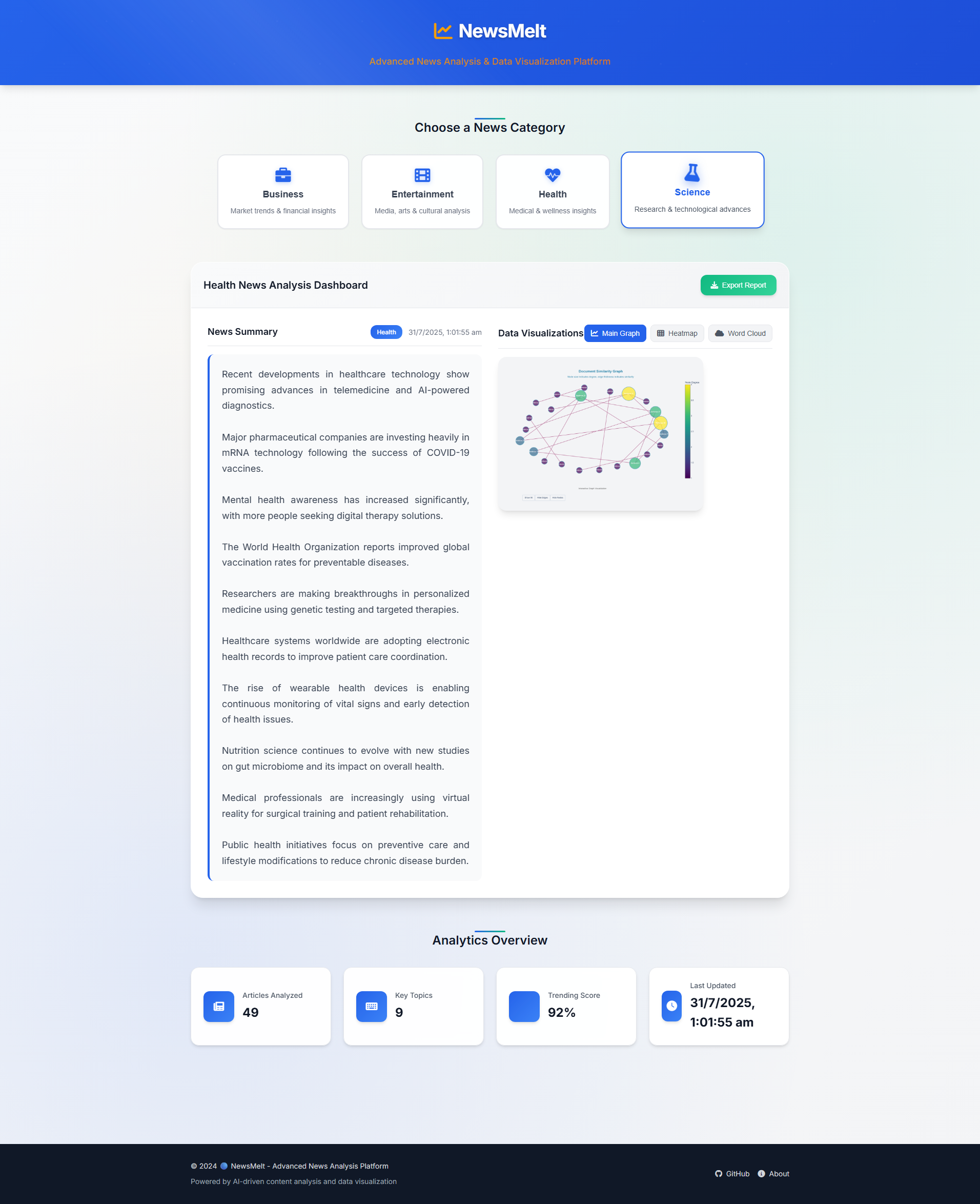
A sophisticated news processing pipeline that combines AI-powered content extraction, advanced NLP techniques, and interactive data visualizations to provide comprehensive news analysis across multiple categories.
What the project includes
Multi-Dimensional Data Visualization
- Interactive charts and graphs using Plotly
- Heatmap visualizations for topic analysis
- Word cloud generation for keyword extraction
- Real-time analytics dashboard
AI-Powered Content Analysis
- Pegasus-XSum: Advanced abstractive summarization
- T5-Base Fine-tuned: News title classification
- SpaCy: Named Entity Recognition (NER)
- NLTK: Text preprocessing and analysis
- NetworkX: Graph-based content analysis
Comprehensive News Processing
- Multi-source news aggregation (NewsAPI, RSS feeds)
- Full content extraction with fallback mechanisms
- Topic classification across 8 categories
- Multi-document summarization
- Sentiment analysis and trend detection
Smart Content Categorization
- Business: Market trends, financial insights
- Entertainment: Media, arts, cultural analysis
- Health: Medical, wellness insights
- Science: Research, technological advances
- Technology: AI, innovation, digital trends
- Politics: Government, policy analysis
- Sports: Athletic events, team analysis
- World: International affairs, global news
Tools and libraries
Core Technologies
- Python 3.8+: Main programming language
- Transformers (Hugging Face): State-of-the-art NLP models
- PyTorch: Deep learning framework
- Pandas & NumPy: Data manipulation and analysis
- Plotly: Interactive visualizations
- NetworkX: Graph analysis and visualization
NLP Models Used
-
google/pegasus-xsum (2.1GB)
- Abstractive text summarization
- Optimized for news content
- Generates concise, informative summaries
-
mrm8488/t5-base-finetuned-news-title-classification (850MB)
- Fine-tuned T5 model for news categorization
- 8-category classification system
- High accuracy on news title classification
-
en_core_web_sm (SpaCy)
- Named Entity Recognition
- Part-of-speech tagging
- Dependency parsing
Web Technologies
- HTML5/CSS3: Modern, responsive interface
- JavaScript (ES6+): Interactive functionality
- Font Awesome: Icon library
- Google Fonts: Typography
Installation & Setup
Prerequisites
- Python 3.8 or higher
- Git
- 4GB+ RAM (for model loading)
- 5GB+ free disk space
1. Clone the Repository
git clone https://github.com/yourusername/News-Extractor-Summarizer.git
cd News-Extractor-Summarizer
2. Create Virtual Environment
# Windows
python -m venv venv
venv\Scripts\activate

# macOS/Linux
python3 -m venv venv
source venv/bin/activate
3. Install Dependencies
pip install -r requirements.txt
4. Set Up Environment Variables
Create a .env file in the root directory:
# Required API Keys
NEWS_API=your_news_api_key_here
5. Download NLP Models
Option A: Automatic Download (Recommended)
The models will be automatically downloaded on first run:
python main.py
Option B: Manual Download
# Create cache directory
mkdir -p cache_dir/transformers

# Download Pegasus-XSum model
python -c "from transformers import PegasusForConditionalGeneration, AutoTokenizer; PegasusForConditionalGeneration.from_pretrained('google/pegasus-xsum', cache_dir='cache_dir/transformers'); AutoTokenizer.from_pretrained('google/pegasus-xsum', cache_dir='cache_dir/transformers')"

# Download T5-Base Fine-tuned model
python -c "from transformers import T5ForConditionalGeneration, AutoTokenizer; T5ForConditionalGeneration.from_pretrained('mrm8488/t5-base-finetuned-news-title-classification', cache_dir='cache_dir/transformers'); AutoTokenizer.from_pretrained('mrm8488/t5-base-finetuned-news-title-classification', cache_dir='cache_dir/transformers')"

# Download SpaCy model
python -m spacy download en_core_web_sm
6. Run the Application
Backend Processing
# Run the complete pipeline
python main.py

# Or run individual components
python run.py
Frontend Interface
Open app/index.html in your web browser or serve it using a local server:
# Using Python
python -m http.server 8000

# Using Node.js (if installed)
npx serve app
Configuration
Model Configuration
Models are configured in src/utils/config.py:
# Summarization Model
SUMMARIZATION_CONFIG = {
    'model_name': 'google/pegasus-xsum',
    'max_length': 150,
    'num_beams': 4,
    'temperature': 1.0
}

# Topic Classification Model
TOPIC_MODELING_CONFIG = {
    'model_path': 'cache_dir/transformers/mrm8488/t5-base-finetuned-news-title-classification',
    'batch_size': 10
}
API Configuration
# News API Settings
NEWS_API_CONFIG = {
    'query': 'business economy finance market...',
    'language': 'en',
    'sort_by': 'popularity',
    'page_size': 100
}
How files are organized
News-Extractor-Summarizer/
├── app/                    # Frontend web interface
│   ├── index.html         # Main dashboard
│   ├── script.js          # Interactive functionality
│   └── style.css          # Styling
├── src/                   # Backend source code
│   ├── core/             # Core processing modules
│   │   ├── content_extractor.py
│   │   ├── graph_summarizer.py
│   │   ├── news_crawler.py
│   │   ├── summarizer.py
│   │   └── topic_classifier.py
│   ├── pipeline.py       # Main orchestration
│   └── utils/            # Utilities and config
├── cache_dir/            # Model cache (gitignored)
├── dataset/              # Processed data (gitignored)
├── output/               # Generated outputs (gitignored)
├── main.py              # Entry point
├── run.py               # Alternative runner
└── requirements.txt     # Dependencies
Usage Examples
Basic News Analysis
from src.pipeline import PipelineOrchestrator

# Initialize and run pipeline
orchestrator = PipelineOrchestrator()
success = orchestrator.run_pipeline()
Custom Topic Analysis
from src.core.topic_classifier import TopicClassifier

classifier = TopicClassifier()
topic = classifier.classify_text("Your news article text here")
print(f"Classified as: {topic}")
Multi-Document Summarization
from src.core.summarizer import MultiSummarizer

summarizer = MultiSummarizer()
summary = summarizer.summarize_text("Your long article text here")
print(f"Summary: {summary}")
API Keys Setup
NewsAPI
- Visit NewsAPI.org
- Sign up for a free account
- Get your API key from the dashboard
- Add to
.env:NEWS_API=your_key_here
Troubleshooting
Model Download Issues
# Clear cache and retry
rm -rf cache_dir/transformers/*
python main.py
Memory Issues
- Reduce batch sizes in config
- Use smaller models for testing
- Ensure sufficient RAM (4GB+ recommended)
API Rate Limits
- Implement retry mechanisms
- Use multiple API keys
- Respect rate limits in configuration
Contributing
- Fork the repository
- Create a feature branch (
git checkout -b feature/amazing-feature) - Commit your changes (
git commit -m 'Add amazing feature') - Push to the branch (
git push origin feature/amazing-feature) - Open a Pull Request
License
This project is licensed under the MIT License - see the LICENSE file for details.
Acknowledgments
- Hugging Face for the transformer models
- NewsAPI for news data
- SpaCy for NLP tools
- Plotly for visualizations
Made by Tuhin-SnapD
Transform your news consumption with AI-powered insights and beautiful visualizations.