Backend & APIs / GoProxy
GoProxy – fast reverse proxy with caching, rate limiting and metrics
GoProxy is a web server that acts as a middleman between your computer and other websites.
Open the full technical write-up
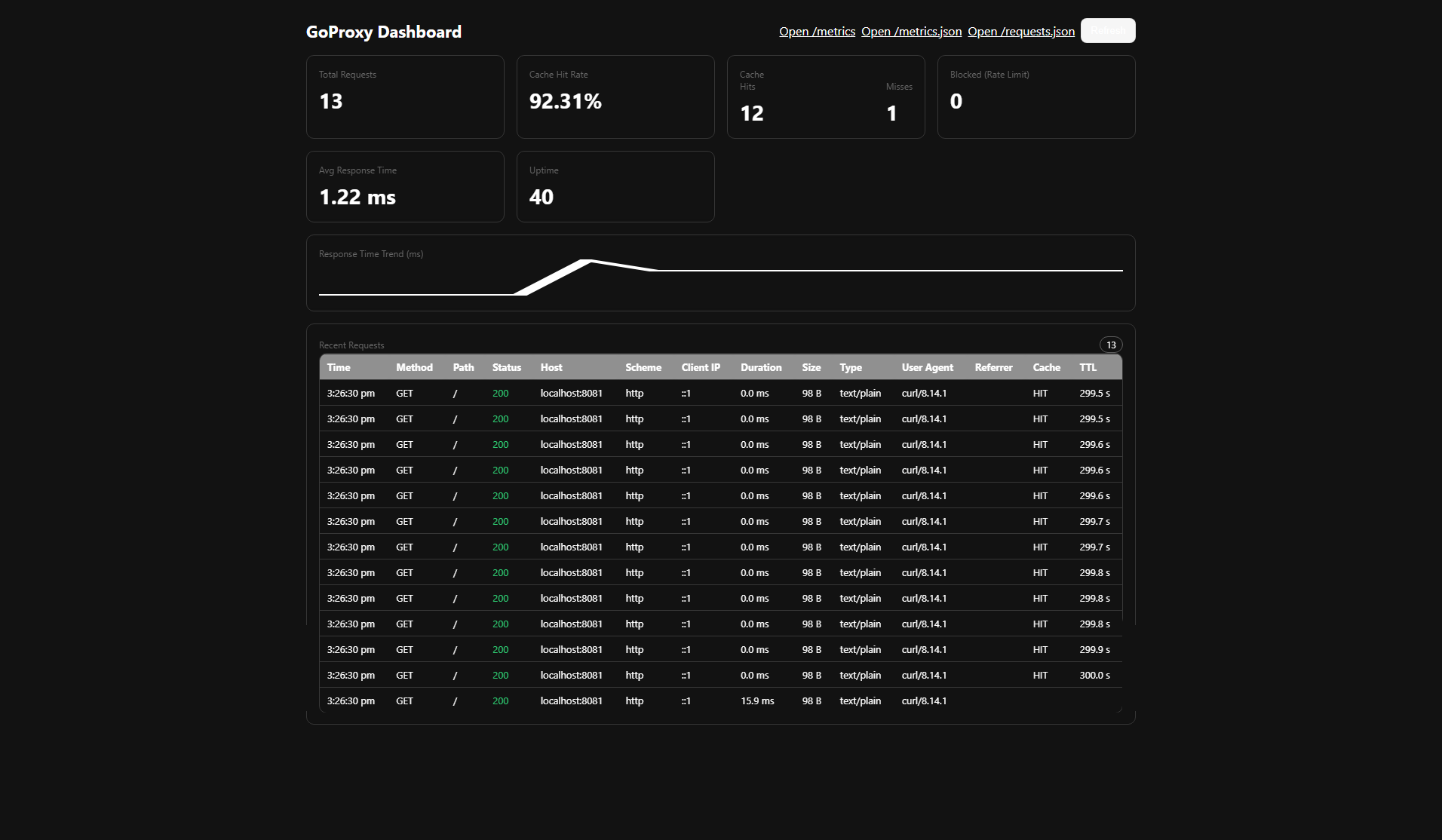
GoProxy is a small reverse proxy written in Go. It caches GET responses, applies per‑IP rate limiting, and exposes Prometheus‑style metrics and a simple UI.
What Does GoProxy Do?
GoProxy sits between clients and your backend service, helping by:
- Making things faster – caches repeat GET responses
- Protecting against overload – rate limits requests per IP
- Keeping track of usage – exposes Prometheus and JSON metrics
- Adding safety – hides your backend behind a single entry point
Core workflows
Speed Boost
- Smart caching: serves repeat GET responses instantly (configurable TTL)
- High performance: built with Go
Protection
- Rate limiting: per‑IP requests/minute
- Request shaping: easy place to add future rules
Monitoring
- Prometheus metrics at
/metrics - JSON metrics at
/metrics.json - Health checks at
/health
Easy to Use
- One‑click Windows scripts
- Docker Compose
- Cross‑platform Go builds
Requirements
- Go 1.21+
- Windows, macOS or Linux
- Optional: Docker + Docker Compose
Quick Start Guide
Windows (one‑click)
Use the included scripts:
run.bat         # builds both binaries, starts backend on :8081 and proxy on :8080
stop.bat        # stops both processes
Change proxy port:
run.bat 9090 # proxy starts on :9090
After startup:
- Proxy:
http://localhost:8080(or chosen port) - Health:
http://localhost:8080/health - UI:
http://localhost:8080/(landing) - Metrics:
http://localhost:8080/metrics
Option 1: Docker
docker-compose up

# Or run in background (recommended)
docker-compose up -d
This will start:
- Proxy server:
http://localhost:8080 - Test backend server:
http://localhost:8081 - (If configured) monitoring stack
Option 2: Manual Installation
Step 1: Install Go
- Windows: download from
https://golang.org/dl/ - macOS:
brew install goor download - Linux: use your package manager (e.g.
sudo apt install golang-go)
Step 2: Build the project
go mod tidy
go build -o goproxy main.go
go build -tags testserver -o test_server test_server.go
Step 3: Run the servers
./test_server                                 # terminal 1 (listens on :8081)
./goproxy -backend http://localhost:8081      # terminal 2 (serves on :8080)
How to Use GoProxy
Basic Usage
Once running, GoProxy will be available at http://localhost:8080.
- Access your backend: requests to
/proxy/are forwarded to the backend - Check health:
GET /health - View metrics:
GET /metricsorGET /metrics.json - Open UI dashboard:
GET /(landing)
CLI Flags
-port           string        proxy listen port (default "8080")
-backend        string        backend base URL (default "http://localhost:8081")
-rate-limit     int           requests per IP per minute (default 100)
-cache-ttl      duration      TTL for cached GET responses (default 5m)
Example:
./goproxy -port 9000 -backend https://example.com -rate-limit 200 -cache-ttl 10m
Endpoints
/UI landing/healthliveness check/metricsPrometheus text metrics/metrics.jsonJSON metrics/proxy/reverse-proxy to backend
Understanding the Metrics
When you visit /metrics, you'll see information like this:
goproxy_total_requests 150        # Total number of requests handled
goproxy_cache_hits 120           # Requests served from cache (fast!)
goproxy_cache_misses 30          # Requests that had to go to backend
goproxy_blocked_requests 5       # Requests blocked due to rate limiting
goproxy_cache_hit_rate 80.00     # Percentage of requests served from cache
What this tells you:
- High cache hit rate (e.g., 80%+) means the cache is effective
- Low blocked requests means rate limits are reasonable
- Increasing total requests shows usage trends
Common Use Cases
1) Website Performance
Use GoProxy in front of your website to:
- Speed up page loads with caching
- Reduce load on your main server
- Protect against traffic spikes
2) API Protection
Place GoProxy in front of your API to:
- Limit how many requests each user can make
- Cache frequently requested data
- Monitor API usage patterns
3) Development Testing
Use GoProxy during development to:
- Test how your app handles high traffic
- Simulate real‑world conditions
- Debug performance issues
Testing Your Setup
Quick Test (Windows)
Run the built‑in test script to verify everything works:
test.bat
Manual Testing
# Test health endpoint
curl http://localhost:8080/health

# Test proxy (should return backend response)
curl http://localhost:8080/proxy/

# Test caching (second request should be faster)
curl http://localhost:8080/proxy/

# Check metrics
curl http://localhost:8080/metrics
Troubleshooting
Common Issues
"Port already in use"
- Another program is using the same port
- Solution: use a different port with
-port 9090or runstop.batfirst on Windows
"Backend not reachable"
- Your backend server isn't running
- Solution: start your backend server first (or use bundled
test_server)
"High memory usage"
- Cache is storing too much data
- Solution: reduce cache TTL with
-cache-ttl 1m
Docker Issues
"go.sum not found" during Docker build
- The Dockerfiles handle dependencies automatically
- Use the updated Dockerfiles (already included)
"Docker containers not starting"
- Check if ports 8080 and 8081 are available
- Stop any services using these ports or modify
docker-compose.yml
Getting Help
- Check logs for error messages
- Verify your backend server is running
- Test with built‑in test scripts
- Check the metrics endpoint for clues
Configuration Examples
For Development
./goproxy -port 8080 -backend http://localhost:3000 -rate-limit 1000 -cache-ttl 1m
- High rate limits for testing
- Short cache time for fresh data
For Production
./goproxy -port 80 -backend https://my-production-site.com -rate-limit 50 -cache-ttl 10m
- Lower rate limits for security
- Longer cache time for performance
For High Traffic
./goproxy -port 443 -backend https://my-busy-site.com -rate-limit 500 -cache-ttl 30m
- Higher rate limits for busy sites
- Long cache time for maximum performance
What's Inside GoProxy?
Proxy Component
- Handles incoming web requests
- Forwards them to your backend server
- Captures responses for caching
Cache Component
- Stores responses in memory
- Automatically removes expired entries
- Makes repeat requests fast
Rate Limiter
- Tracks requests per IP
- Blocks clients who exceed the limit
- Protects your server from overload
Metrics Component
- Counts requests, cache hits, etc.
- Provides performance statistics
- Helps you understand usage patterns
Performance Tips
For Best Performance
- Use appropriate cache TTL: longer for static content, shorter for dynamic
- Set reasonable rate limits: high enough for normal use, low enough to prevent abuse
- Monitor metrics: watch cache hit rates and response times
- Scale horizontally: run multiple proxy instances for high traffic
Memory Usage
- Cache size depends on TTL and request volume
- Monitor memory usage in production
- Adjust cache TTL if memory usage is too high
Security Considerations
Rate Limiting
- Prevents abuse and DoS attacks
- Configurable per your needs
- Tracks by IP address
Headers
- Adds proxy identification headers
- Preserves original request information
- Can be customized for your needs
Getting Started Checklist
- Install Go (if not using Docker)
- Download and build GoProxy
- Start your backend server
- Start GoProxy
- Test the health endpoint
- Test proxy functionality
- Check metrics
- Configure for your needs
Contributing
- Fork the repository
- Make your changes
- Test thoroughly
- Submit a pull request
License
MIT